
Auditors don't want to see a generic risk library copy-pasted into your register. They want risks specific to YOUR business. With evidence you actually identified them.
So what do traditional GRC platforms give you? A library of 100+ generic risks to scroll through and manually pick from.
You run your assessment. Identify gaps. Then you open the risk register. Blank page. Start again. Manually selecting risks, manually scoring them, manually linking to controls.
Same thinking. Twice.
The Duplication Problem Nobody Talks About
Here's what happens in most organisations. Someone runs a security assessment. They find gaps. They write a report. Then someone else (or the same person, weeks later) opens the risk register and starts from scratch.
"What risks do we have?" they ask. As if they didn't just answer that question.
The assessment identified insufficient backup testing. The risk register needs a risk about data loss from backup failures. Same issue, entered twice, with no connection between them.
When the auditor asks "how did you identify this risk?", you point to... the same assessment that should have created the entry automatically.
This isn't just inefficient. It creates real problems.
Why This Matters
Disconnected assessments and risk registers create three issues that come back to bite you:
Audit trail gaps. When your risk register exists independently from your assessment, proving how you identified risks becomes a documentation exercise. You end up writing memos explaining that Risk #47 came from Question 23 of the assessment. That's work that adds no value.
Inconsistent scoring. Your assessment might rate a control gap as "high priority". Your risk register might score the same underlying issue as "medium". Now you're explaining discrepancies instead of fixing problems.
Stale registers. When populating the register is manual work, it gets delayed. Assessments happen, reports get written, but the risk register sits unchanged because updating it is a separate task on someone's list. By the time it's updated, you've already done another assessment.
What We Built
We connected the two. Complete your assessment on RateYourCyber. Your risk register populates automatically from YOUR gaps. Each risk traced back to the exact assessment question that triggered it.
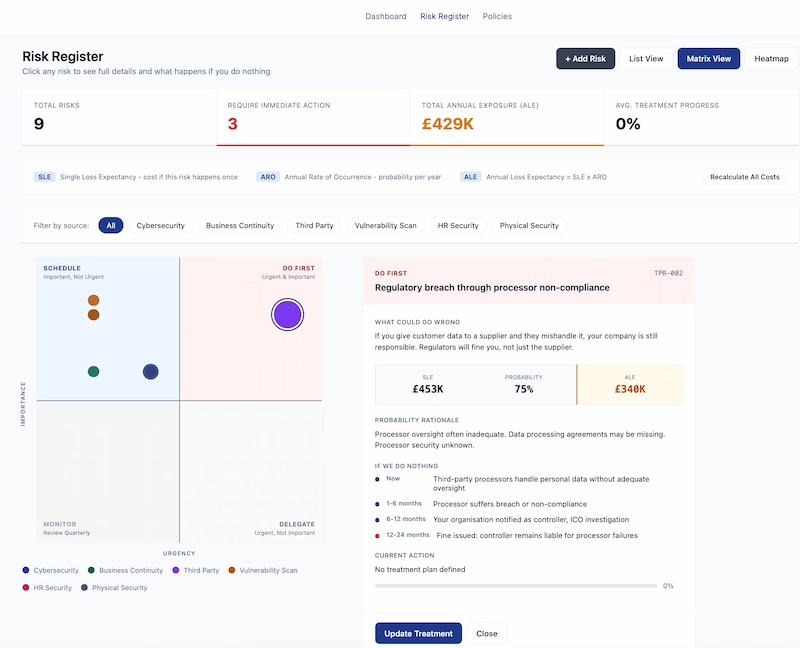
Likelihood scores come from your answers. Financial exposure comes from your company data. Treatment plans link to your roadmap.
Not a library to pick from. An actual register built from your actual assessment.
How It Actually Works
When you complete a cybersecurity assessment, the platform analyses your responses. Where you indicate gaps or weaknesses, corresponding risks are created automatically.
Say you indicate that your organisation doesn't have a formal incident response plan. The system creates a risk entry for "Security incident without documented response procedures". The likelihood score reflects what you told us about your environment. The financial impact uses your organisation's profile data.
Each risk links back to its source. Click on any risk and you see exactly which assessment question triggered it. When the auditor asks how you identified this risk, you show them the direct connection.
Financial Quantification That Makes Sense
Generic risk registers give you "High/Medium/Low" scores. Useful for prioritisation, but try presenting that to a board.
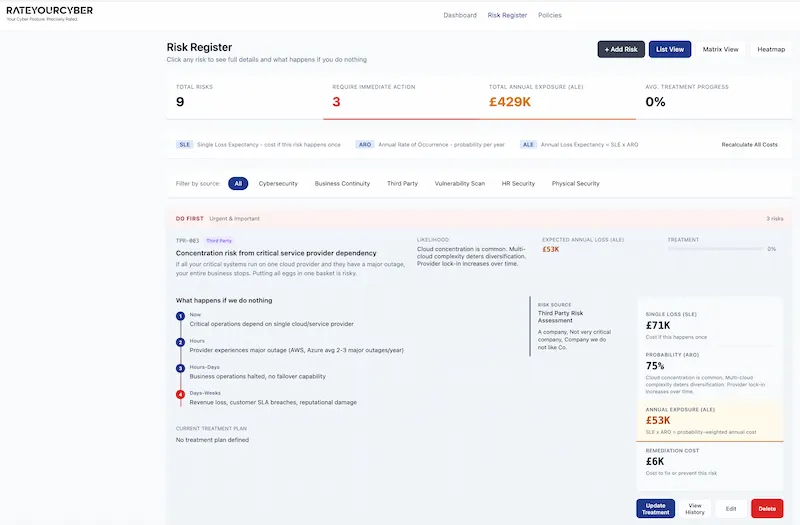
Our risk register calculates actual financial exposure. Single Loss Expectancy (what it costs if this happens once) multiplied by Annual Rate of Occurrence (how often it's likely to happen) gives you Annual Loss Expectancy.
When you tell the board "we have a high risk in access control", they nod politely. When you tell them "inadequate access controls represent approximately £340,000 in expected annual loss", you get their attention.
Prioritisation Built In
And yes, everything comes prioritised. Risks classified by severity, sorted by business impact, ready to action. No extra work to figure out what to tackle first.
The Eisenhower matrix view shows you what needs immediate action (urgent and important), what to schedule (important but not urgent), what to delegate (urgent but not important), and what to monitor (neither urgent nor important).
You see at a glance where to focus. No manual sorting. No separate prioritisation exercise.
Treatment Plans That Connect to Your Roadmap
Identifying risks is only half the job. You need to do something about them.
When you update a risk with a treatment plan, that plan links to your overall security roadmap. The remediation activities appear in your 3-year plan. Progress on treatment updates the risk entry automatically.
One workflow. Full audit trail. Zero duplication.
What Happens If You Do Nothing
Each risk in the register shows a timeline of consequences. Not abstract risk statements, but specific scenarios that play out over time.
Take third-party processor risk. Right now, your processors handle personal data without adequate oversight. In 1-6 months, one of them suffers a breach. In 6-12 months, your organisation gets notified as the controller. In 12-24 months, the ICO investigation concludes with you liable for processor failures.
This isn't fear mongering. It's what actually happens when risks materialise. Showing the progression helps stakeholders understand why action matters now rather than later.
Multiple Assessment Sources, One Register
Your risk register shouldn't only reflect cybersecurity gaps. Business continuity issues create risks. Third-party dependencies create risks. HR security gaps create risks. Physical security weaknesses create risks.
RateYourCyber pulls from all your assessments. Run a business continuity assessment and relevant risks appear in the register. Complete a third-party review and supplier risks get added. Everything in one place, all traceable to source.
Filter by source when you need to focus on a specific domain. See the complete picture when you need the full view.
Sources That Feed Your Risk Register
Cybersecurity Assessment, Business Continuity Assessment, Third-Party Risk Assessment, HR Security Assessment, Physical Security Assessment, and Vulnerability Scanning. All feeding one unified register with full traceability.
The Auditor's Perspective
When auditors review your risk register, they're looking for evidence that you actually identified these risks through systematic assessment. Not that you copied them from a template.
With RateYourCyber, every risk entry has a clear lineage. Assessment question to risk entry to treatment plan to remediation activity. The audit trail exists automatically because the system creates it.
No documentation theatre. No retrospective memos explaining where risks came from. The evidence is built into the workflow.
Who This Helps
If you're already running security assessments and maintaining a risk register as separate activities, this eliminates the duplication. If you're starting fresh, you skip the problem entirely.
Particularly useful for:
Organisations preparing for certification. ISO 27001, SOC 2, and similar frameworks require documented risk assessment processes. Having assessment and register connected demonstrates systematic risk identification.
Companies with limited security staff. When one person handles assessment and risk management, eliminating duplication frees time for actual improvement work.
MSPs managing multiple clients. Maintaining separate assessment findings and risk registers for each client doesn't scale. Automated population does.
Anyone tired of explaining the same gaps twice. Run the assessment. Get the register. Move on to fixing things.
Getting Started
If you've already completed assessments on RateYourCyber, your risk register is already populated. Log in and check Risk Register in your dashboard navigation.
If you're new, start with the cybersecurity assessment. Your identified gaps become risk entries automatically. Add more assessments over time and watch your register build itself.
No separate risk identification exercise. No manual data entry. No duplication.
Stop Building Your Risk Register Twice
See how RateYourCyber connects assessment findings directly to your risk register, with full audit trail and financial quantification.
What you get:
- Automatic risk population from assessment gaps
- Full traceability from question to risk to treatment
- Financial quantification (SLE, ARO, ALE) not just High/Medium/Low
- Eisenhower matrix prioritisation built in
- Treatment plans linked to your security roadmap
- Multiple assessment sources feeding one register
One workflow. Full audit trail. Zero duplication.
Start Your Assessment Learn More